Office & admin
Books that stay caught up
Snap a receipt in the truck, finish a job, forward a bill. We set up AI that logs it, drafts the invoice and keeps your books tidy for your accountant. Your accountant stays your accountant.
At a glance
Bookkeeping & Invoicing Automation
- Starting at
- $3,500 per workflow
- Typical timeline
- Most are live in 2–3 weeks, then run next to your old process until you and your accountant trust it
- Works with
- QuickBooksZohoExcelGoogle SheetsGmail +4 more
Set up in person, on your own accounts
What it is
In plain English
Bookkeeping falls behind for the same reason everywhere: the work of the day comes first. Receipts ride around in the truck, bills sit in the inbox, and invoices wait until someone has a quiet evening. Then the accountant asks for the year, and you lose a weekend hunting through email for the bill you know you paid.
We set up AI that does the boring part as it happens. A photo of a receipt becomes a logged expense on the right job. A bill that lands in email gets read and queued in QuickBooks. A finished job turns into a drafted invoice, built from the estimate and the job notes, waiting for you to check and send. Past-due reminders get drafted on time, so you don’t have to be the one who remembers.
Your accountant stays in charge. We don’t replace your accountant, and we don’t do taxes or give tax advice. We set the categories and rules with your accountant or bookkeeper, so what we build hands them clean records in the format they want. They still review, adjust and sign off. They just start from organized files instead of a pile.
Where a person takes over. Nothing here moves money. Paying a bill, sending an invoice or closing out a month always takes a person. Anything the AI can’t read clearly, or that doesn’t match the rules, lands in a short review list instead of being guessed.
Dom keeps the books for his own construction company and rental properties with a related system. It turns a year of bank statements into an accountant-ready workbook and flags every unclear item instead of guessing. See Books from bank statements for how it runs, or read How to automate small-business bookkeeping (without firing your accountant).
What’s included
What you get
Set up on your accounts, tested with your real work, and explained to your team before we call it done.
- Receipt capture from a phone photo: vendor, date, amount and job pulled out and logged
- Bills that arrive by email read and queued in QuickBooks or your spreadsheet for review
- Invoices drafted from job notes, a finished estimate or a closed work order, approved by you before they go out
- Friendly reminders drafted for past-due invoices, on the schedule you choose
- Bank and card transactions sorted into your categories, with anything odd flagged for a person
- A clean monthly package for your accountant: sorted transactions, receipts and open questions in one place
- Built on your own QuickBooks, Zoho or spreadsheet, with rules you and your accountant agree on
How it works
One example, step by step
A typical setup. We shape every step around how your business already runs, and you approve anything that goes out.
Example workflow
Bookkeeping & Invoicing Automation, start to finish
-
Step 1
Snap
Your foreman takes a photo of the lumber yard receipt before it fades on the dashboard.
-
Step 2
Read
The AI pulls out the vendor, date, amount and tax, and matches it to the right job.
-
Step 3
Log
It adds the expense to QuickBooks or your spreadsheet, marked for review.
-
Step 4
Invoice
When the job wraps up, it drafts the invoice from the estimate and job notes for you to check.
-
Result
Hand off
Each month your accountant gets clean, sorted records and a short list of questions.
Tools, timing & price
What it takes to get it running
Tools we use
- QuickBooks
- Zoho
- Excel
- Google Sheets
- Gmail
- Outlook
- Claude
- Gemini
- Zapier
We’re not a reseller or partner of any of these companies. You sign up in your own name, and we set it up and train you on it.
Typical timeline
Most are live in 2–3 weeks, then run next to your old process until you and your accountant trust it.
Counted from the day you approve the written plan. We test with your real work before anything goes live.
Starting at
$3,500 per workflow
Automation Build
Final price after the audit. QuickBooks and other software stay billed to you directly by the vendor, with no markup.
- You own every account and file
- No long-term contract
See it work
Try it with sample data
Drop in an invoice. Fields are pulled out, checked and added to a spreadsheet you can export.
Drag an invoice hereTap a sample invoice
The AI reads it, checks the math and adds a row to your sheet.
Nothing leaves your browser.
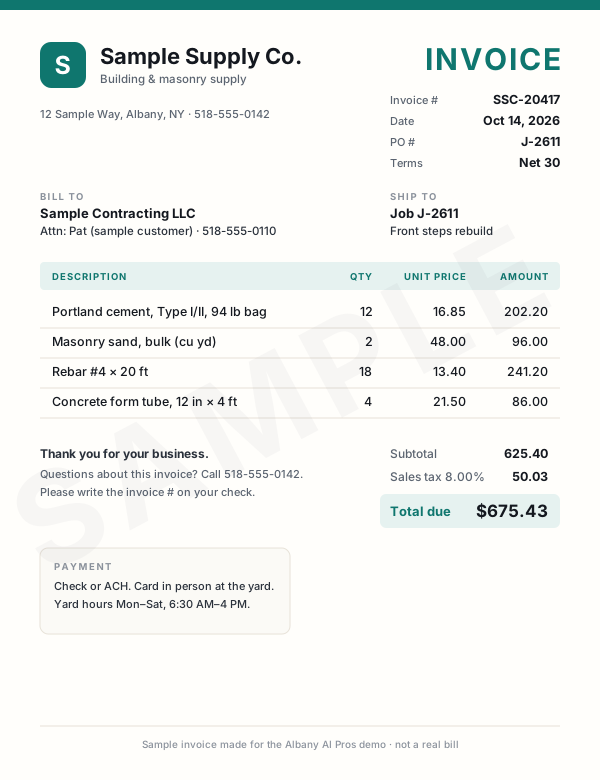
This demo only reads our sample invoices. Nothing leaves your browser. Drag or tap one of the samples instead.
Sample invoices Drag one onto the page, or click it Tap an invoice to read it
What the AI read
WaitingWaiting for an invoice.
- Vendor
- —
- Invoice #
- —
- Date
- —
- PO / job
- —
- Line items
- —
- Subtotal
- —
- Tax
- —
- Total
- —
- Terms & due
- —
- Category AI's pick
- —
All three bills are in the sheet, and nobody typed a thing.
We set this up on the bills you already get: email attachments, scans, or photos snapped in the truck. They land in your spreadsheet or bookkeeping app, checked and waiting for your OK.
Tip: drop one of them in again.Tip: tap one of them again. Duplicates get caught.
| Vendor | Total | Due | Invoice # | Date | PO | Category | Subtotal | Tax | |
|---|---|---|---|---|---|---|---|---|---|
| 1 | Rows land here as each invoice is read. | ||||||||
| Total | |||||||||
Live demo with sample data. We build the real version on your own accounts.
Want your bills typed up for you?Questions
Straight answers
Have a different one? Call or text (518) 704-3125.
More questions and answersDo I still need my accountant?
Yes. This doesn't replace your accountant or bookkeeper. It does the typing and sorting so they get clean records instead of a box of receipts. We set the categories and rules with them, and they still handle your taxes, filings and advice.
Will it pay bills or move money?
No. It reads, sorts, logs and drafts. Paying a bill, sending an invoice or moving money always takes a person clicking the button.
What if it reads a receipt wrong?
It will sometimes, especially a faded or crumpled one. That's why every entry comes in marked for review, and anything it isn't sure about gets flagged instead of guessed. You or your bookkeeper check them before anything is final.
Keep exploring
Where this fits in
Industries that use it
Real work: we run this at our own company
- Case study Books from bank statements A year of bank statements and platform reports turned into an accountant-ready workbook with a P&L, balance sheet, ledger and reconciliations. Read how it works
- Case study Owner's live dashboard One page that updates itself: open bids, active jobs, who is waiting on a call back and what needs doing today. Read how it works
Also in Office & admin
- Email & Inbox Automation Your inbox sorted every morning into leads, customers, bills, vendors and junk, with replies drafted for you to approve. Details
- Document Automation Proposals, quotes, contracts and reports drafted from your notes on your own templates, ready for you to check and send. Details
- Scheduling & Calendar Automation Customers book, confirm and reschedule by text or email, and your calendar stays right without the back-and-forth. Details
Want to see everything? All services · All demos · Real work · Text us a question
Free intro visit
Let’s find the hours you’re losing.
Tell us where to call. We’ll set up a free 30‑minute visit at your office — or a quick call if that’s easier.
We come to you anywhere in the Capital Region. Our office at 401 New Karner Road, Albany is open by appointment only. Mówimy po polsku.
Get a call back
Two fields. A real person calls back, usually the same business day.
Got it — we’ll call you soon.
Need us sooner? Call or text (518) 704-3125.
Prefer to tell us more? Use the full request form.