Books from bank statements
A year of statements, ready for the accountant
A year of bank statements and platform reports turned into an accountant-ready workbook with a P&L, balance sheet, ledger and reconciliations.
Case study 04 of 07
Books from bank statements
- Where it runs
- In use at The Dom Construction Group www.TheDomConstruction.com
- Built with
- ClaudePythonExcel
- We set this up as
- Bookkeeping & Invoicing Automation
Every screen on this page uses made-up sample data
The problem
Where the hours went
Dom runs a construction company and manages rental properties, and each business has its own bank accounts. Every year the accountant needs clean books for each one. That used to mean a pile of PDF statements, rental payout reports that never matched the deposits, and weekends spent typing transactions into a spreadsheet and guessing what a payment from March was for.
What we built
The system, step by step
What it does, in the order it does it. A person checks the result before anything leaves the office.
-
It reads every line of every statement, every month, with no sampling and no netting.
-
Each transaction is sorted using a payee list built from our own past years, and anything unclear is marked "verify" instead of guessed.
-
Money moved between our own accounts and companies is kept as a transfer, never counted as income or expense.
-
Every month has to tie to the bank statement to the penny before the workbook gets built.
-
Platform payout reports are matched to the deposits, so bookings, fees and taxes line up.
-
One workbook per company, with an income statement, balance sheet, ledger, cash by account, monthly and platform reconciliations and notes.
-
It ends with a short list of open questions for the accountant.
Tools
- Claude
- Python
- Excel
We’re not a reseller or partner of any of these companies. They’re the tools we use ourselves, and we set them up on your own accounts.
What changed
What’s different now
In plain words. No made-up percentages or “hours saved”, just what we notice day to day.
- The accountant gets the same clean format every year, for every company.
- Every month reconciles to the bank before anyone sees it, so there's no "close enough".
- Unclear items come with a note that says what they are and what would settle them.
- Year-end went from a dreaded stack of statements to reviewing a finished draft.
- Rental income finally matches the platform reports, fees and taxes included.
Sample output
What the system hands us
The kind of screen this system produces, filled with made-up names, jobs and amounts.
Income statement
Totals are formulas| Income | |
|---|---|
| Long-term rent | $36,000 |
| Short-term rental bookings | $20,000 |
| Total income | $56,000 |
| Operating expenses | |
| Repairs and maintenance | $8,400 |
| Property taxes | $6,000 |
| Utilities | $4,200 |
| Cleaning and supplies | $3,000 |
| Insurance | $2,400 |
| Platform fees and taxes | $2,000 |
| Bank fees | $120 |
| Total expenses | $26,120 |
| Net income | $29,880 |
Classification pending · not in totals yet
- Deposit from an unfamiliar sender (verify) $2,000
- Credit card autopay (verify) $3,600
Transfers between our own accounts are kept out of income and expenses.
Ties to the bank
12 of 12 months- Jan diff 0.00
- Feb diff 0.00
- Mar diff 0.00
- Apr diff 0.00
- May diff 0.00
- Jun diff 0.00
- Jul diff 0.00
- Aug diff 0.00
- Sep diff 0.00
- Oct diff 0.00
- Nov diff 0.00
- Dec diff 0.00
Start + deposits − withdrawals − fees = statement ending balance, to the penny.
Platform payouts
Matches deposits- Gross bookings
- $20,000
- Platform fees
- − $1,200
- Taxes the platform paid
- − $800
- Payouts deposited
- $18,000
Ledger · one row per bank line
March, excerpt- 03/01 Rent deposit · Unit 2 Long-term rent +$1,500.00
- 03/04 Sample Hardware · supplies Repairs and maintenance −$180.00
- 03/14 Deposit · unfamiliar sender Pending (verify) +$2,000.00
- 03/15 Transfer to Sample Builders Inc. Owner transfer · excluded −$1,000.00
- 03/31 Monthly service fee Bank fees −$10.00
Open questions for the accountant
- March 14 deposit from a sender we don’t recognize. What was it for?
- Card autopay every month. We need the card statements to split it.
- New water heater in July. Repair, or an improvement to depreciate?
Sample output with made-up data
The full story
How it works in practice
Bookkeeping for one company is a chore. For several, it’s a second job. We have the construction company, plus rental properties, each with its own accounts. Some get payouts from short-term rental platforms, where the deposit you see is never the booking amount you earned.
Every year the accountant asks for the same thing: a ledger, a P&L and a balance sheet for each company, and it has to match the bank. We used to do that by hand, statement by statement. It took forever, and the guesses made late at night were exactly the ones the accountant asked about later.
How it runs day to day
The statements for a company go into one folder: every month, every account, plus the platform earnings reports and the tax forms like 1098s and 1099s. First, Claude checks that the year is complete. If a month is missing, it asks for it before doing anything else.
Then it pulls every transaction into a ledger, one row per bank line. A Python script checks each month: the starting balance, plus deposits, minus withdrawals and fees, has to equal the ending balance on the statement. If it doesn’t, a line was missed or mistyped, and it goes back and finds it. It never plugs the difference.
Transactions get sorted with a payee list from our past years. Transfers between our own accounts stay out of income and expenses. Anything it isn’t sure about, like a large deposit from a sender it doesn’t know, a loan paid under a personal name, or a credit card autopay without the card statement, goes into a “classification pending” block with a numbered note.
In the finished workbook, every total is a formula. The accountant can click any number and see exactly where it came from.
What still needs a person
The judgment calls. Was that purchase a repair or an improvement? Is that transfer a loan or a draw? Those questions go to the accountant with a note, and Dom answers the ones only he knows. The system gets the books ready. The accountant still does the taxes and signs off.
If your books live in a shoebox
If your year-end looks like a stack of PDFs and a pile of receipts in the truck, this is for you. We set it up for your companies, your accounts and the format your accountant already wants. Read more about bookkeeping and invoicing automation, or how to automate small business bookkeeping step by step.
Try something like it
A demo you can run now
Drop in an invoice. Fields are pulled out, checked and added to a spreadsheet you can export.
Drag an invoice hereTap a sample invoice
The AI reads it, checks the math and adds a row to your sheet.
Nothing leaves your browser.
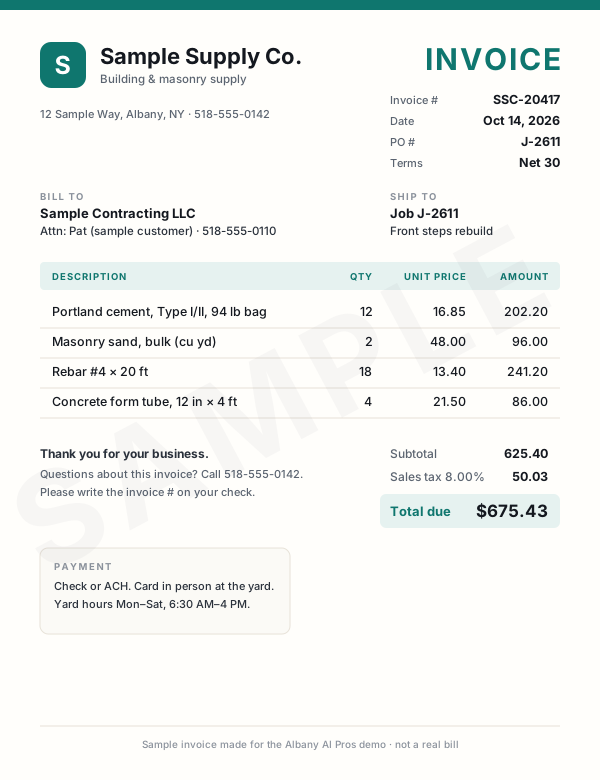
This demo only reads our sample invoices. Nothing leaves your browser. Drag or tap one of the samples instead.
Sample invoices Drag one onto the page, or click it Tap an invoice to read it
What the AI read
WaitingWaiting for an invoice.
- Vendor
- —
- Invoice #
- —
- Date
- —
- PO / job
- —
- Line items
- —
- Subtotal
- —
- Tax
- —
- Total
- —
- Terms & due
- —
- Category AI's pick
- —
All three bills are in the sheet, and nobody typed a thing.
We set this up on the bills you already get: email attachments, scans, or photos snapped in the truck. They land in your spreadsheet or bookkeeping app, checked and waiting for your OK.
Tip: drop one of them in again.Tip: tap one of them again. Duplicates get caught.
| Vendor | Total | Due | Invoice # | Date | PO | Category | Subtotal | Tax | |
|---|---|---|---|---|---|---|---|---|---|
| 1 | Rows land here as each invoice is read. | ||||||||
| Total | |||||||||
Live demo with sample data. We build the real version on your own accounts.
Want your bills typed up for you?We can build this for you
Want this at your company?
You don’t need our exact setup. We build the version that fits your work, on your own accounts, starting from how you do it today.
- Set up in person, at your office
- You own every account and file
- No long-term contract
or call/text (518) 704-3125
The service behind it
Prices are starting points. The final price depends on your setup, and software is billed to you directly by each vendor, with no markup. See pricing
More real work
Other systems we run every day
- Owner's live dashboard One page that updates itself: open bids, active jobs, who is waiting on a call back and what needs doing today. Read the case study
- Paperwork on autopilot Certificates of insurance, vendor forms, registrations and prequal packets filled from one saved company file, then checked by a person. Read the case study
- Website & local marketing Our construction company's own website, lead form, Google Business Profile posts, ads and conversion tracking, all set up with AI. Read the case study
- AI estimating & takeoff Drawing sets measured, priced and cross-checked by three AI models, then turned into the estimate workbook, proposal and marked-up sheets. Read the case study
- Bid Radar Every weekday morning it reads our inbox and New York's public bid sites, scores each opportunity for fit and sends one ranked report. Read the case study
- Supplier & sub pricing requests A personal pricing-request email for every supplier and sub on the list, drafted in one go, sent one at a time, with replies and follow-ups tracked. Read the case study
Want to see more? All services · All demos · AI for contractors · Text us a question
Free intro visit
Want a system like this of your own?
Tell us where to call. We’ll set up a free 30‑minute visit at your office — or a quick call if that’s easier.
We come to you anywhere in the Capital Region. Our office at 401 New Karner Road, Albany is open by appointment only. Mówimy po polsku.
Get a call back
Two fields. A real person calls back, usually the same business day.
Got it — we’ll call you soon.
Need us sooner? Call or text (518) 704-3125.
Prefer to tell us more? Use the full request form.