Paperwork on autopilot
Prequal packets without the late nights
Certificates of insurance, vendor forms, registrations and prequal packets filled from one saved company file, then checked by a person.
Case study 06 of 07
Paperwork on autopilot
- Where it runs
- In use at The Dom Construction Group www.TheDomConstruction.com
- Built with
- ClaudeGoogle DriveGoogle SheetsGmailBluebeam
- We set this up as
- Compliance Paperwork
Every screen on this page uses made-up sample data
The problem
Where the hours went
Every new general contractor, school district or property manager wants the same facts in a different form. A certificate of insurance with their exact wording. A vendor questionnaire. A state registration. A prequalification packet with the safety program, references, equipment list and crew certifications. Each one meant an evening of digging through old PDFs and retyping answers we had already given over and over, and one wrong policy date or legal name could hold up a job or a payment.
What we built
The system, step by step
What it does, in the order it does it. A person checks the result before anything leaves the office.
-
One saved company file with the facts every form asks for: legal name and address, trades, years in business, insurance policies and dates, licenses, safety program, references and crew certifications.
-
AI that reads each new form or questionnaire and fills it from that file, in the requester's own format.
-
Certificate of insurance requests drafted with the holder's exact name and the additional-insured wording the contract asks for.
-
A packet checklist that shows what's filled, what's attached and what still needs a signature or a letter from someone else.
-
Questions the file can't answer get flagged for a person instead of guessed.
Tools
- Claude
- Google Drive
- Google Sheets
- Gmail
- Bluebeam
We’re not a reseller or partner of any of these companies. They’re the tools we use ourselves, and we set them up on your own accounts.
What changed
What’s different now
In plain words. No made-up percentages or “hours saved”, just what we notice day to day.
- A packet that used to eat an evening is now mostly a review job.
- The same question gets the same answer every time, so a new form never contradicts an old one.
- Missing pieces show up on day one, not the night before the deadline.
- Insurance certificate requests go out with the right wording the first time, with less back-and-forth with the agent.
- More time goes to the work that wins jobs: pricing, site visits and calling customers back.
Sample output
What the system hands us
The kind of screen this system produces, filled with made-up names, jobs and amounts.
Assembled from your company file
7 of 10 documents ready
Due Friday · put together at 6:40 AM
- 7 ready
- 2 need you
- 1 waiting on someone else
Packet checklist
10 items
-
Certificate of insurance Ready
Holder name and additional-insured wording filled
-
W-9 Attached
Signed copy from the company file
-
Contractor questionnaire 2 need you
41 of 43 answers filled from the company file
-
Safety program Attached
Written program, reviewed this year
-
EMR letter Attached
Experience rating letter from the insurance agent
-
Crew certifications Attached
OSHA 10 and OSHA 30 cards for 6 people
-
Equipment list Ready
Filled from the company file
-
Job references Ready
3 similar jobs from the last 5 years
-
Signature page Sign
Filled in, needs your signature and a notary stamp
-
Bonding capacity letter Waiting
Requested from the bonding agent Tuesday
Contractor questionnaire
Page 1 of 4
- Legal business name
- Sample Construction LLC AI
- Years in business
- 12 AI
- Trades
- Masonry · Stucco & EIFS · Concrete AI
- General liability policy period
- 01/01/2026 – 01/01/2027 AI
- Q14. Describe your safety program.
- Written program reviewed every year. Weekly toolbox talks on every job. Fall protection plan for any work over 6 feet. AI
- Q22. Largest single contract in the last 3 years?
- Not in the company file. Flagged for you instead of guessed.
Certificate of insurance
Ready to issue- Certificate holder
- Sample GC, Inc.
100 Sample Way, Albany, NY - Additional insured
- Owner and general contractor, as the contract requires
- Coverage shown
-
- General liability
- Auto
- Umbrella
- Workers’ comp
Wording copied from the contract. Policy dates checked against the company file.
Nothing goes out until a person signs. 3 items are waiting on you or your agent.
Sample output with made-up data
The full story
How it works in practice
If you’ve ever worked for a school district, a big general contractor or a property management company, you know the drill. Before you can bid, or before you can get paid, there’s paperwork. A certificate of insurance naming them as additional insured. A vendor questionnaire. A W-9. Your safety program. References. An equipment list. Sometimes a state vendor registration on top.
None of it is hard. It’s the same handful of facts, typed into a different form every time, usually at night after a full day on site.
One company file, filled once
At The Dom Construction Group, we keep one saved company file. Legal name and address, trades, years in business, insurance policies and dates, licenses, the written safety program, crew certifications and job references. When something changes, like a new policy year, it changes there and nowhere else.
When a new form comes in, AI reads it, matches each question to the company file and fills it in. A questionnaire that asks us to describe our safety program gets the same answer we gave last time, trimmed to fit the box. A certificate request gets the holder’s exact name and the additional-insured wording from the contract, so the insurance agent can issue it without three emails back and forth.
The packet checklist shows the whole thing at a glance. Green means filled or attached. Yellow means it needs a person. Blue means we’re waiting on someone else, like a letter from the bonding agent.
A person still signs
The system doesn’t guess. If a form asks something that isn’t in the file, like a bank reference for a new owner or a project size we’ve never listed, it gets flagged and waits. Nothing goes out until someone has read it and signed.
That part matters. Paperwork is where small mistakes get expensive: a lapsed date, the wrong legal name, a missing endorsement. AI is good at filling forms fast. A person is good at noticing when something looks off. We use both.
If you fill in the same forms over and over
Contractors aren’t the only ones buried in forms. Property managers fill vendor packets and insurance requests for every owner. Medical and dental offices redo credentialing paperwork. Accounting and insurance offices type the same client facts into form after form. If you answer the same questions over and over, we can set up a company file and a filling workflow on your own Google or Microsoft account.
See how we handle compliance paperwork and document automation, or try the paperwork demo to watch an invoice turn into spreadsheet rows in a few seconds.
Try something like it
A demo you can run now
Drop in an invoice. Fields are pulled out, checked and added to a spreadsheet you can export.
Drag an invoice hereTap a sample invoice
The AI reads it, checks the math and adds a row to your sheet.
Nothing leaves your browser.
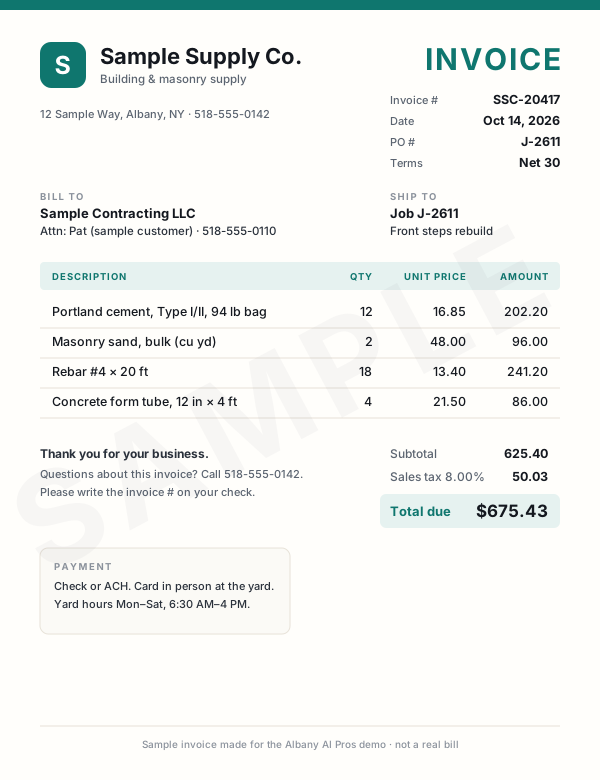
This demo only reads our sample invoices. Nothing leaves your browser. Drag or tap one of the samples instead.
Sample invoices Drag one onto the page, or click it Tap an invoice to read it
What the AI read
WaitingWaiting for an invoice.
- Vendor
- —
- Invoice #
- —
- Date
- —
- PO / job
- —
- Line items
- —
- Subtotal
- —
- Tax
- —
- Total
- —
- Terms & due
- —
- Category AI's pick
- —
All three bills are in the sheet, and nobody typed a thing.
We set this up on the bills you already get: email attachments, scans, or photos snapped in the truck. They land in your spreadsheet or bookkeeping app, checked and waiting for your OK.
Tip: drop one of them in again.Tip: tap one of them again. Duplicates get caught.
| Vendor | Total | Due | Invoice # | Date | PO | Category | Subtotal | Tax | |
|---|---|---|---|---|---|---|---|---|---|
| 1 | Rows land here as each invoice is read. | ||||||||
| Total | |||||||||
Live demo with sample data. We build the real version on your own accounts.
Want your bills typed up for you?We can build this for you
Want this at your company?
You don’t need our exact setup. We build the version that fits your work, on your own accounts, starting from how you do it today.
- Set up in person, at your office
- You own every account and file
- No long-term contract
or call/text (518) 704-3125
The service behind it
Prices are starting points. The final price depends on your setup, and software is billed to you directly by each vendor, with no markup. See pricing
More real work
Other systems we run every day
- Website & local marketing Our construction company's own website, lead form, Google Business Profile posts, ads and conversion tracking, all set up with AI. Read the case study
- AI estimating & takeoff Drawing sets measured, priced and cross-checked by three AI models, then turned into the estimate workbook, proposal and marked-up sheets. Read the case study
- Bid Radar Every weekday morning it reads our inbox and New York's public bid sites, scores each opportunity for fit and sends one ranked report. Read the case study
- Supplier & sub pricing requests A personal pricing-request email for every supplier and sub on the list, drafted in one go, sent one at a time, with replies and follow-ups tracked. Read the case study
- Books from bank statements A year of bank statements and platform reports turned into an accountant-ready workbook with a P&L, balance sheet, ledger and reconciliations. Read the case study
- Owner's live dashboard One page that updates itself: open bids, active jobs, who is waiting on a call back and what needs doing today. Read the case study
Want to see more? All services · All demos · AI for contractors · Text us a question
Free intro visit
Want a system like this of your own?
Tell us where to call. We’ll set up a free 30‑minute visit at your office — or a quick call if that’s easier.
We come to you anywhere in the Capital Region. Our office at 401 New Karner Road, Albany is open by appointment only. Mówimy po polsku.
Get a call back
Two fields. A real person calls back, usually the same business day.
Got it — we’ll call you soon.
Need us sooner? Call or text (518) 704-3125.
Prefer to tell us more? Use the full request form.