Construction & trades
COIs, prequals and vendor forms, off your desk
Every new GC, owner and agency wants the same facts on a different form. We set up AI that keeps your company information in one place, fills out prequalification packets, vendor forms and registrations from it, and gets your certificate of insurance requests out with the right wording.
At a glance
Compliance Paperwork
- Starting at
- $3,500 per workflow
- Typical timeline
- Most are live in 1–2 weeks, starting with your company fact file
- Works with
- ClaudeChatGPTGoogle DriveGoogle SheetsExcel +4 more
Set up in person, on your own accounts
What it is
In plain English
A new GC wants their prequal filled out before they’ll send you the bid set. A school district wants a vendor registration. The owner’s rep calls because the COI they have on file expired last week, and your crew can’t start until it’s fixed. You’ve answered every one of those questions before. The trouble is finding where.
This is how paperwork works at Dom’s own company now. See paperwork on autopilot. The company’s facts live in one file: licenses, insurance, bonding, safety record, references, past projects. When a form shows up, AI reads it, fills in what it can from that file and flags what’s missing instead of guessing. Someone checks it, signs it and sends it.
Public work brings its own stack: wage schedules, certified payroll, MWBE forms, bid bonds and non-collusion affidavits. We build checklists from the bid documents so nothing is left blank on bid day, and reminders so insurance, licenses and registrations get renewed before they lapse, not after a GC notices.
Bids bring paperwork, so this sits well next to bid finding. Winning brings more, and that’s where proposals, SOVs and submittals comes in. The paperwork demo shows the reading step on sample data: an invoice goes in and labeled fields come out in a spreadsheet. Here, that same step reads a GC’s prequal and matches each question to your company file.
What’s included
What you get
Set up on your accounts, tested with your real work, and explained to your team before we call it done.
- One company fact file: legal name, licenses, insurance, bonding, safety record (EMR and OSHA logs), references, past projects and key people
- Prequalification packets and vendor questionnaires filled out from that file, for you to review and sign
- COI requests drafted for your insurance agent with the holder name, additional insured and waiver of subrogation wording the contract asks for
- Expiration tracking for insurance, licenses and registrations, with reminders before anything lapses
- A list of the bid portals and vendor registrations you're on and when each one renews (your passwords stay with you)
- Bid-day checklists built from the bid documents: every form, affidavit, bond and signature required
- Prevailing wage paperwork organized per job, with optional certified payroll drafts built from your payroll export for the person who signs them to check
How it works
One example, step by step
A typical setup. We shape every step around how your business already runs, and you approve anything that goes out.
Example workflow
Compliance Paperwork, start to finish
-
Step 1
Request comes in
A GC sends a prequal, an agency wants a vendor form, or a new contract needs a COI.
-
Step 2
Read it
AI reads the form and the contract and lists exactly what's being asked.
-
Step 3
Fill it
Answers come from your saved company file. Anything missing gets flagged, not guessed.
-
Step 4
You check
You review, sign and send, or forward the COI request to your agent.
-
Result
Track it
Expirations and renewals go on the calendar, with reminders before anything lapses.
Tools, timing & price
What it takes to get it running
Tools we use
- Claude
- ChatGPT
- Google Drive
- Google Sheets
- Excel
- Google Calendar
- Outlook
- Microsoft 365
- Google Workspace
We’re not a reseller or partner of any of these companies. You sign up in your own name, and we set it up and train you on it.
Typical timeline
Most are live in 1–2 weeks, starting with your company fact file.
Counted from the day you approve the written plan. We test with your real work before anything goes live.
Starting at
$3,500 per workflow
Automation Build
Final price after the audit.
- You pay software vendors directly, at their price, with no markup
- You own every account and file
- No long-term contract
See it work
Try it with sample data
Drop in an invoice. Fields are pulled out, checked and added to a spreadsheet you can export.
Drag an invoice hereTap a sample invoice
The AI reads it, checks the math and adds a row to your sheet.
Nothing leaves your browser.
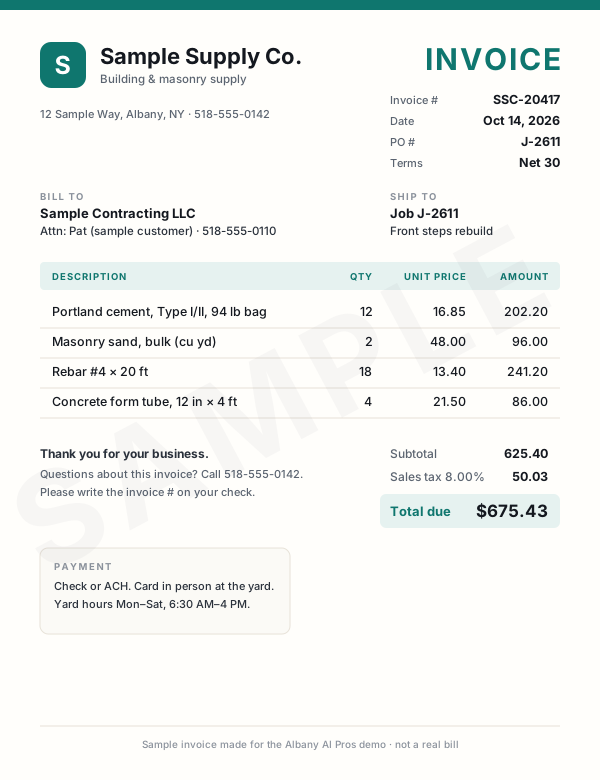
This demo only reads our sample invoices. Nothing leaves your browser. Drag or tap one of the samples instead.
Sample invoices Drag one onto the page, or click it Tap an invoice to read it
What the AI read
WaitingWaiting for an invoice.
- Vendor
- —
- Invoice #
- —
- Date
- —
- PO / job
- —
- Line items
- —
- Subtotal
- —
- Tax
- —
- Total
- —
- Terms & due
- —
- Category AI's pick
- —
All three bills are in the sheet, and nobody typed a thing.
We set this up on the bills you already get: email attachments, scans, or photos snapped in the truck. They land in your spreadsheet or bookkeeping app, checked and waiting for your OK.
Tip: drop one of them in again.Tip: tap one of them again. Duplicates get caught.
| Vendor | Total | Due | Invoice # | Date | PO | Category | Subtotal | Tax | |
|---|---|---|---|---|---|---|---|---|---|
| 1 | Rows land here as each invoice is read. | ||||||||
| Total | |||||||||
Live demo with sample data. We build the real version on your own accounts.
Want your bills typed up for you?Questions
Straight answers
Have a different one? Call or text (518) 704-3125.
More questions and answersIs it safe to put our company information into AI?
We set it up on business accounts with data training turned off where the vendor offers that, and your files stay in your own Google or Microsoft account. Bank account numbers and passwords stay out of the fact file entirely. We walk you through exactly what's stored and where, and our AI and data policy spells out the rest.
Can it fill out the state and agency portals for us?
Many vendor and prequal portals only take answers typed into their own web pages, and we don't set anything up to log in as you. For those, AI lines up every answer in the order the portal asks for it, and you or your office person does the clicking and the signing. Most prequals and vendor forms that arrive as PDF or Word files it can fill out directly for you to check.
Does this handle certified payroll on prevailing wage jobs?
It can prepare the reports from your payroll export and the job's wage schedule, and flag anything that looks off. It doesn't replace your payroll company, your accountant or the person who signs the certification. Those reports carry legal weight, so a person checks and signs every one.
Keep exploring
Where this fits in
Industries that use it
Real work: we run this at our own company
Paperwork on autopilot Case study Certificates of insurance, vendor forms, registrations and prequal packets filled from one saved company file, then checked by a person. Read how it worksAlso in Construction & trades
- Estimating & Takeoff Automation AI measures quantities from your PDF drawings, three models cross-check the count, and you review every number. Details
- Bid Finding & Tracking Every morning, AI checks NY public bid sites and your inbox, scores what fits your trades and sends you a ranked list. Details
- Supplier & Sub Pricing Requests Personal pricing-request emails drafted for your whole supplier and sub list, queued for your OK, tracked until quotes are in. Details
- Proposals, SOVs & Submittals Proposals, schedules of values and submittal packages drafted from your estimate and the specs, in your format, ready to check. Details
Want to see everything? All services · All demos · Real work · Text us a question
Free intro visit
Let’s find the hours you’re losing.
Tell us where to call. We’ll set up a free 30‑minute visit at your office — or a quick call if that’s easier.
We come to you anywhere in the Capital Region. Our office at 401 New Karner Road, Albany is open by appointment only. Mówimy po polsku.
Get a call back
Two fields. A real person calls back, usually the same business day.
Got it — we’ll call you soon.
Need us sooner? Call or text (518) 704-3125.
Prefer to tell us more? Use the full request form.